Showing posts with label Smart Phone. Show all posts

Friday, December 4, 2015

Latest Xiaomi RedMi Note 3 Coupon Price USD 169


The latest middle level flagship from Mi (world's fourth largest smart phone maker) RedMi Note 3 is really nice, featuring full metal casefinger print sensor and amazing 4000 mAh battery.
5.5 inch 1080p screen ,the design is similar to iPhone 6 Plus. Although the battery is huge, but the phone is still pretty thin, maximum thickness is only 8.65 mm。

CPU is MTX Helio X10,which is a flagship level CPU with 8 cores。

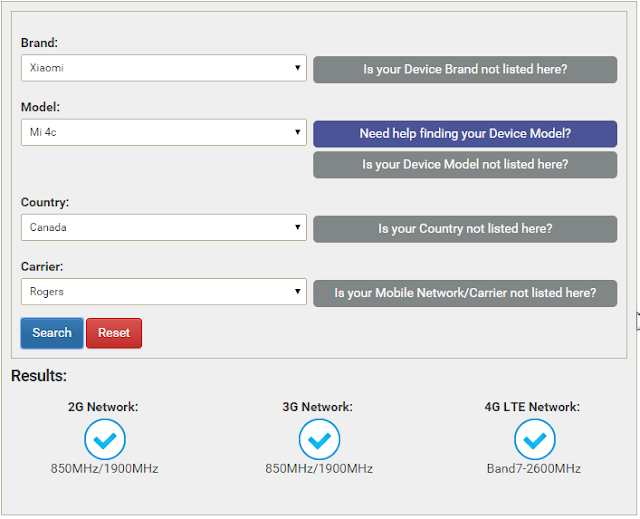
Supports dual SIM standby. You can look this site http://willmyphonework.net/ to find if this phone is supported by your carrier.


The price for 16G ROM, 2G RAM version is USD 179, use Coupon 16NOTEGRAYML reduce to USD 169.89 (Grey):

RedMi Note 3 16G ROM 2G RAM USD169.89

The price for 32G ROM, 3G RAM version is USD 209.79,use Coupon 32GBNOTE3ML reduce to USD 199.89 (Grey or Silver):

红米RedMi Note 3 32G ROM 3G RAM USD199.89

Since MircoSD card extension is not supported, it is recommend to buy the 32 ROM version.

Wednesday, November 25, 2015

Latest Xiaomi RedMi Note 3 32G only USD 199


The latest middle level flagship from Mi (world's fourth largest smart phone maker) RedMi Note 3 is really nice, featuring full metal case,finger print sensor and amazing 4000 mAh battery.
5.5 inch 1080p screen ,the design is similar to iPhone 6 Plus. Although the battery is huge, but the phone is still pretty thin, maximum thickness is only 8.65 mm。

CPU is MTX Helio X10,which is a flagship level CPU。

Supports dual SIM standby. You can look this site http://willmyphonework.net/ to find if this phone is supported by your carrier.


Gearbest price is pretty good and shipping is free:

The price for 16G ROM, 2G RAM version is USD 179, use Coupon 16NOTEGRAYML reduce to USD 169.89 (Grey):

RedMi Note 3 16G ROM 2G RAM USD169.89

The price for 32G ROM, 3G RAM version is USD 209.79,use Coupon 32GBNOTE3ML reduce to USD 199.89 (Grey or Silver):

红米RedMi Note 3 32G ROM 3G RAM USD199.89


Since MircoSD card extension is not supported, it is recommend to buy the 32 ROM version.


Friday, November 13, 2015

OnePlus X with Coupon USD 241 (no invitation needed)


ONEPLUS X 4G 3GB Smartphone -  WHITE 
5.0 inch Android 5.1 Qualcomm Snapdragon 801 Quad Core 2.3GHz 3GB RAM 16GB ROM Corning Gorilla Glass 3 Screen 8MP + 13MP Cameras

Use Coupon PLUSXML price is reduced to USD 268.88. Free shipping.


16GB ROM is small but since OnePlus X supports up to 128G microSD, this is not a big problem.

Latest Xiaomi RedMi Note 3 only USD 209

Saturday, October 24, 2015

OnePlus2 Killer: Lenovo ZUK Z1

Lenovo ZUK Z1 International Edition 4G Smart Phone 
Use Coupon Code:GBZUKZ1 reduce to USD 284


OnePlusOne was called Flagship Killer. It was indeed true. With popular Cynogenmod OS, flagship hardware and low price, OnePlusOne was very popular.

However, OnePlusTwo is a little disappointment: Cyanogenmod is replaced by OnePlus's own Oxygen OS, Lack NFC and quick charge.

Now it is the turn for Lenovo ZUK Z1 to play the role of OnePlusTwo killer. Both has similar hardware but Lenovo has several of key advantage: Cynogenmod OS, 4100mAh battery and much lower price.


Current price is USD 299 (free shipping, no tax). However, on October 26, 2015 5:00am Eastern Time, there will be a big promotion on Lenovo ZUK Z1, only limit to first 100 phones.

Following are the comparisons between Lenovo ZUK1 Z and OnePlusTwo:

Price

Lenovo ZUK Z :USD 299 ,Free Shipping,No Tax,No Duty(Win)
OnePlusTwo:USD 389 + Shipping + Tax , also need invitation.

Design

Lenovo ZUK Z :Aluminum frame,similar with iPhone 6 Plus(Win)
OnePlusTwo:No big changes from OnePlusOne

OS

Lenovo ZUK Z :Cyanogen OS 12.1 5.5 (Win)
OnePlusTwo:OxygenOS

Cyanogen is one of the best Android systems. It is too bad that OnePLusTwo abandon it. OxygenOS is developed by OnePlus its own but can not compare with Cyanogen since it is just introduced.


Battery
Lenovo ZUK Z :4100 mAh, Support Quick Charge(Win)
OnePlusTwo:3300 mAh


接口
Lenovo ZUK Z :USB-Type C 3.0(Win)
OnePlusTwo:USB-Type C 2.0
现在新出的旗舰级不用正反都可以插的USB-Type C接口都不好意思。虽然都用了USB-Type C,但Lenovo 的是V3.0,OnePlusTwo是V2.0。V3.0传输数据比V2.0 快十倍。


Screen

Lenovo ZUK Z :5.5 inch Screen,1920x1080 pixels (Tie)
OnePlusTwo:5.5 inch Screen,1920x1080 pixels

RAM/ROM

Lenovo ZUK Z :64G ROM 3G RAM(Tie)
OnePlusTwo:64G/16 ROM 4G/3G RAM

Fingerprint Id

Lenovo ZUK Z :Latest fingerprint sensor technology, fast and support 360 dgrees identification (Win)
OnePlusTwo:Support fingerprint id


CPU

Lenovo ZUK Z :Snapdragon 801
OnePlusTwo:Snapdragon 810(Win)
810 is faster than 801, but 810 has overheating issue. 801 is already fast enough for most of the daily tasks.

Camera

Both has Optical Image Stabilizer, double flash lights.  OnePlusTwo has a bigger aperture (F2.0 vs F2.2)

Carriers Support

Both are unlocked, with dual SIM cards support.
You can check the follow site to see if this phone supports your carrier:
http://www.willmyphonework.net/


Other reviews:
http://www.digitaltrends.com/cell-phone-reviews/lenovo-zuk-z1-review/

Friday, October 16, 2015

Xiaomi Mi4C Smart Phone USD 239

Mi4C is the latest flagship smart phone from Xiaomi, the world's fourth largest smart phone company.

It can be bought at Gearbest with free shipping.

小Xiaomi Mi4C 2G Memory,16G Capacity USD 239

小Xiaomi Mi4C 3G Memory,32G Capacity USD 275


Chinese Official WebSite
http://www.mi.com/mi4c/

External Review
http://www.gsmarena.com/xiaomi_mi_4c-7512.php

It supports many LTE networks in North America. For example, it supports 3 big carriers in Canada (Rogers, Bell and Telus).

Check http://www.willmyphonework.net/ to find out if this phone support your carrier.


When choose shipping method, make sure do not choose Auto(Free) and add Tracking number (free for order over $40)
If you need the phone deliver the phone faster, consider choose Expedited Shipping (arrive in one week).

It is also recommend to add Shipping Insurance. So you can get full refund if the package is lost.

XIAOMI RedMi Note 2 LTE Only USD 162 With coupon

Tuesday, October 13, 2015

XIAOMI RedMi Note 2 LTE Only USD 162 With coupon


RedMi Note 2 is a smart phone product from Xiaomi (http://www.mi.com/en/), the world's 4th largest smart phone producer (after Samsung, Apple, Huawei) .

Main Features

  • 5.5 inch 1920 x 1080 (FHD) screen 400 PPi
  • MTK Helio X10 Octa Core 2.0GHz 
  • 2G Memory
  • 3060mAh changeable battery
  • Dual SIM, Dual Standby
  • Support external MicroSD Card

Android Authority Review

Support 4G (LTE)  for 3 major Canada carries (Rogers, Bell, Telus)。
Please check the following website to see if this phone support your carrier:
http://www.willmyphonework.net/


This phone can be purchased from Gearbest for USD 162:

RedMi Note 2 16G LTE Black  $162.00 (with coupon :NOTE16BLACK)
RedMi Note 2 16G LTE White  $165.89 (with coupon NOTE16GBG)
RedMi Note 2 32G LTE Black $176.99 (with coupon NOTE32GBGL)
RedMi Note 2 32G LTE White $176.99 (with coupon NOTE32GBGL)

If choose the free flat rate shipping method, it is recommend to add Tracking number. It may take long time (10-25 business days),usually no tax or duty will be charged.

If choose the Expedited Shipping, the shipping time is fast (in one week). However, you may be charged duty and tax by the shipping company like DHL.
Following is


Recommend use Paypal. If not suing Paypal, Gearbest may request additional personal identity.

For expensive item like smart phone, it is recommend to add Shipping Insurance (around USD5),otherwise, Gearbest may only refund half of the value if the package is lost.


Xiaomi Mi4C Smart Phone USD 239

Saturday, May 16, 2015

Solve One Plus One Wi-Fi Internet Connection Issue After Upgrading to Cyanogen 12

My One Plus One starts getting Wi-Fi Internet connection issue after upgrading to Cyanogen 12 (Android 5). Wi-Fi always shows connected. However, there is no Internet connection from time to time. Turn off and turn on Wi-Fi can fix the problem but after a few minutes, the Internet connection is lost again.

My router is pretty new ASUS RT-AC68U and support both 2.4GHz and 5GHz. It seems changing the Wi-Fi setting by turning off Scan always available and only connect to 2.4GHz  and solve this problem.

Here is how:

Go to Settings, select Wi-Fi, then open the menu at top right corner and select Advanced.


Turn off Scanning always available.


Select Wi-Fi frequency band (default is Automatic).


Choose 2.4GHz.


Friday, November 14, 2014

Tips on how to use OnePlus One Phone (3)

Slow Motion Video

Do you know OnePlus can take slow motion video like iPhone 6? The interface for slow motion is not as easy as iPhone but once you know how to do it, it is no hard.

First, you can choose the Size. If you choose 1080p, the Slow Motion can only provide 60FPS, which may not be smooth enough. So I recommend choosing 720p as the Size and then choose 120FPS for Slow Motion.


One this is done. All the videos you taken will be slow motion video. If you want to switch back to normal video, you need to go back to the same setting place and turn off the Slow Motion.

Quiet Hours

Want to automatically turn off the sound for all the notifications and phone calls during sleep time? You can use the Quiet Hours feature to achieve that. 

Go to Settings, Sound, Quiet hours, choose when the quiet time time range and what to turn off during that time. 

Note that the QUIET HOURS title in the Quick Setting Panel is not equivalent to Enforce quiet hours in Quiet hours settings.  If you enable QUIET HOURS tile, it will enforce quiet hours right away and ignore the schedule. This means even current time is not quiet hours, the sound and light will be turned off always. So do not turn on QUIET HOURS tile if you still want to receive notification light and sound. 

Profiles

You can define multiple profiles, each profile can defines a list of actions like turn off GPS, Bluetooth, Sync, NFC, Notification. For each profile you can manually choose or triggered automatically through NFC tag, Wi-Fi network or Bluetooth connection. 


For example, you can define a Home profile and remove Lock screen mode. Then define the home Wi-Fi network as the trigger. So once you are in home (connected to home Wi-Fi), you no longer need to unlock the screen. Similarly, you can define a Work profile triggered by Wi-Fi network of your company and set sound of all notifications to off. 

Another example, is create a Automobile profile and triggered by connecting to the Bluetooth on you car. The Automobile profile defines GPS enabled so that you can use it to navigate. 

OnePlus One: How to solve problem of no notification sound and light


This is quite inconvenient, suddenly there is no notification sound and lights for any events, like hangout message, GMail. Even the notification is displayed on the status bar.

First thing to check is if you have Quiet hours (Under Sound setting) enabled and current time is between the start and end of the quiet hour.


If current time is not quiet hours and even you disable Enforce quiet hours, there is still no notification sound and light. Next thing to check is if you have the QUIET HOURS tile turned on in the Quick Setting Panel.


If you enable the QUIET HOURS, what will happen is it will always enforce the quiet hours, even current time is not the during the quiet hours you defined. So always no no notification sound or light unless you turned this off. This looks like a bug to me. But the latest system update (44S) still does not fix this problem.

So to solve this problem for now, you just need to tap on the QUIET HOURS tile to disable it (grey out). This should fix the problem.


Thursday, November 13, 2014

Tips on how to use OnePlus One Phone (2)

Capacitive keys

Although I get used to the on screen key (my previous phone is Nexus), I still set my OnePlus One to use capacitive keys to get more screen space. Another reason is that you can add more functions to the capacitive keys for long press or double-taps.

Under the Buttons setting, I set Long press action for Home button to invoke Search assistant (Google Now). Double tap Home button will display the Recent apps switcher (similar to the right on screen key). Long press on Menu button will switch back to last app.


Even on the lock screen, you can give more functions to the capacitive keys. Under Settings, Button actions, you can add more actions to capacitive keys. For example, you can choose Home unlock. This means after you double-tap to turn on the screen, you can just press on the Home button to unlock, no need to slide.


Battery Status Reset

Battery status on OnePlus One has a additional feature which allows you to reset the battery status. 
Just click on the Garbage icon on the top right corner. The battery status will reset. This is useful when you want to check if any action you take has immediate impact on the battery power consumption.


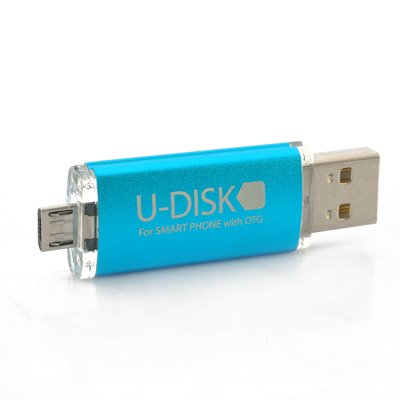
USB OTG Support


OnePlus One supports USB OTG out-of-the-box. No need to install any software or root, just plugin a USB OTG cable and a USB drive, or directly plugin a OTG USB drive.

Once plugin, the Storage settings will be displayed and shows the options of Unmount and Erase. Now you can use File Manager to browse the content in the USB drive. You can directly view the photos or play movie in the drive. 


Tips on how to use OnePlus One Phone (1)


Lock Screen

The default lock screen on OnePlus looks like the one on the left (Custom lock screen). But I like the right one since it has Slider shortcuts. You can slide to unlock and open the application in one step. It also displays calendar events when you slide down the Clock widget.


To get the lock screen with slider shortcuts, you just need to un-select Custom lock screen in the Lock screen setting. Clicking on the Clock widget allows you to configure what to display, time, weather or calendar events. 


To display all events on lock screen you need to select display next event and un-select Reminders only.

By default, the calendar events does not show on lock screen, you need to swipe down the Clock widget to display the events. If you want to show events without swipe down, you can select Maximize widgets on the lock screen.

By selecting Camera widget, slide to the left on the lock screen brings out the Camera. Select Custom widgets, sliding to the right on the left allows you add more lock screen widgets.

To configure the slider shortcuts, you select Slider shortcuts under Lock screen setting, then slide to the position you want to update. A list of apps will be displayed. If the one you want to add is not in the list, select Apps to get the list of all apps.


Google Now Launcher

If your previous phone is Nexus, you may prefer the Goolge Now Launcher. So you can get transparent status bar and launching Google Now by swiping to the right.
You can down load the Google Now Launcher from Google Play store. 
https://play.google.com/store/apps/details?id=com.google.android.launcher&hl=en

Once installed, you can select Google Now Launcher as default Home in the Home setting.


Gestures

Black Screen gestures is introduced by LG G2 (like double-tab to wake). OnePlus also has gestures support and it provides more useful gestures. This is another area iPhone needs to catch up.

Double-tap - Turn on screen
I use this all the time. No need to reach for the tiny Power button! This is so important for a phone without physical home button.
This gesture should be enabled by default. If not, you can select it under Display & lights setting.


Double-tap on Status Bar - Turn off screen
Status bar is located at the top of the screen (where battery status, time are displayed).  Again save you from reaching for the Power button and also help on saving battery.

This gesture should be enabled by default. If not, you can select it under Status bar setting.

If you are on the lock screen, you can double-tab any places on the screen to turn off screen. This is convenient if you just want to check the time/weather/event display on the lock screen. Just double-tap turn on screen and double-tap again to turn off.

Draw circle - Activate camera
With screen off, draw a circle (does not need to be perfect) can turn on screen and open camera. This is my favorite gestures.


Draw a V - Turn on or off flashlight
With this feature, OnePlus phone is more convenient than  a real flashlight.

Draw fingers vertically - Play/pause music
With these gesture, OnePlus phone can play music without need to turn on and look at screen (as convenient as iPod). What I found is that the you have to draw the vertical line long enough (like half of the screen) to be recognized.
Sometimes the music play may be triggered accidentally, for example, when you just wiping the dust from the screen. You may want to disable this gesture in this case.

Draw arrow - Play Next/previous track
 Draw > Play next track. Draw > Play previous track. You can also achieve the same thing by long pressing volume up/down key while screen is off.

Notification Light

One of the good features Android phone has but iPhone does not has is the notification light. However, Nexus doe not provide options for you to customize different color for notification for different apps. You may need to buy some third party apps to do that like (Light Flow).

Good news is  OnePlus One provides this feature out-of-the-box, so you no longer need to install Light Flow. This may save your some memory.

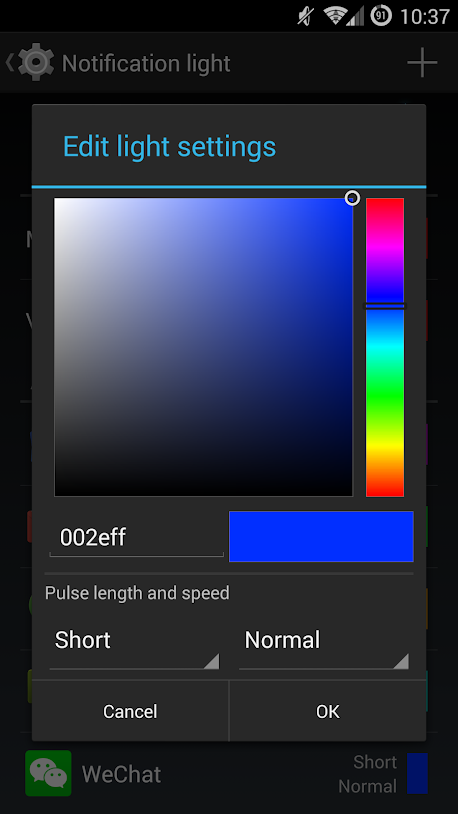
To configure different color for different applications, you can go to Display and lights settings, select Notification light.

In the following screen, select Use custom values  and then tap the + sign on the top right corner to choose the apps you want to configure notification light color. You can configure the color, pulse length and speed.


More topics:


OnePlus2 Killer: Lenovo ZUK Z1 USD 284

OnePlus2 Killer: Lenovo ZUK Z1

Tips on how to use OnePlus One Phone (1)


How to save OnePlus One battery

Free Shipping + UP to 67% OFF: Xiaomi Brand Special Collection