Friday, May 4, 2012

Free for this weekend - iPad Game Star War Pit Droids


For this weekend (May 4 to 6) only, you can download the Star War Pit Droid game for free from iTune!
Click on the following icon to go to its iTune page.
I played a little. The first few levels are pretty simple. But it gets more tricky as you go on. Definitely worth to download, especially you are Star War fan.


Enjoy.

Thursday, May 3, 2012

How to Automatically Push Android Photos to Desktop

When iCloud is introduced, Apple brags about the Photo Stream Feature. Basically, the photos taken by iPhone can automatically appear on your other iOS device and Desktops (PC or Mac).

Actually, Google Android can achieve the same function through Google+ Instant Upload and Picasa Sync to Web.

Here is how to do that:
First, install Google+ on your Android phone .

Open Google+, Click on Photos, then press on Menu key and select Settings.
Check Turn on Instant Upload. You can also set when to upload photos (like WiFi only).

Now, every time you take a photo using your Android phone, the photo will be automatically uploaded to Google+ Instant Upload album.

To automatically push to photo from Google+ Instant Upload album to your PC or Mac, you need to install Google Picasa.
Open Picasa, Select File > Import from Google+ Photos.
Select Instant Upload Album to import
After import is finish, you can find the album under Instant Upload
Select the Instant Upload album, then switch the Sync to Web on.
You are done! The sync process may take a while.
The best part is: the changes you made to the photos (like add Caption, Comments) in Picasa will be automatically sync to Google+ Instant Upload Album too. The other way works too (Changes made in Google+ Instant Upload Album sync to Picasa).
If you do not want to wait the sync happens automatically, you can right click on Instant Upload album in your Picasa and select Online Actions > Refresh Online Status
If you want to have a look at where the photos are stored on your desktop, you can right click on the Instant Upload album and select Locate on Disk.





Wednesday, May 2, 2012

Finally: Desktop App for Amazon Cloud Drive

There are many exciting news recently from the major players of the cloud storage services. Microsoft SkyDrive provides Dropbox like Desktop App, Google introduces Google Drive, Dropbox provides new functions. Now it is turn for Amazon's Cloud Drive.
Install is pretty easy. After installation is finish, you just need to sign in.

Unlike Dropbox (SkyDrive, Google Drive and Apple iCloud), Cloud Drive Desktop App does not create local folder on your PC or Mac.

Instead, it only creates an icon on your task bar (all of the major players do). To upload file, you  can drag the file or a folder to the icon.

You can also right click on the file or foler and select Send to / Amazon Cloud Drive.

In my opinion, I still like the Dropbox style local folder. The Amzaon Desktop App only make upload files easier, but you can not organize the filer on your local file system like all other major players do. But anyway this is a big improvement from the Web interface only choice.


Tuesday, May 1, 2012

How to Take Screenshot on iOS and Android

Sometimes you finished a game level and want to take a screenshot and show off to your friends. If you are suing iPhone or iPad, it is easy. Just press and hold the Home button, then click the power button.
You will hear a Camera shutter sound and the screen will white out and then come back. The screenshot will be in your Camera Roll of the Photo app.
If you have iCloud enabled and have the iCloud client installed on your PC or Mac, the screenshot will automatically push to your PC or Mac through Photo Stream.

To take a screenshot on Android without third party software is different story. It is not for normal user. It is more like for developer. You need to download and install Android SDK on your PC first. Then enable USB debugging mode on your Android device and connect to PC and run DDMS application to do the screen capture.
Here is the link for the detail steps.
http://www.addictivetips.com/mobile/how-to-take-screenshots-of-android-device/

Now you should understand the difference between iOS device and Android device. One is for everyone, Another is for Geek.


Monday, April 30, 2012

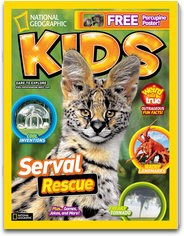
iPad Magazine - National Geographic Kids

Want iPad to be more educational to kids than a game machine? National Geographic Kids is a good start. 


For $1.99 a issue, I think it it worth the money. It is not just a magazine. It is interactive, with sound, video and animation. Also have some fun games for learning. Most important, kids actually like it.


A good news is that the issues after May, 2012 will be the high resolution version which utilize the new  iPad's retina display. So it will be very clear and sharp, maybe comparable to paper magazine.


To order it, just click Store button on your Newstand and search National Geographic Kids and install it. After that, you can have a free sampler and the option of order one issue for $1.99 and one year (10 issues) for $19.99.


If you want to subscribe for National Geographic magazine (pager), here is the link ($16 for 12 issues). 
You can also get the iPad version for free.


https://w1.buysub.com/pubs/NG/NGM/57851_NGMDomDirect_12_Facebook.jsp?cds_page_id=57851&cds_mag_code=NGM&id=1335893089474&lsid=21221217162022430&vid=4

Wednesday, April 25, 2012

Google Currents - Flipboard on Android


Still waiting for the Flipboard to come to Android? No need to wait, Google introduce the Google Currents on both Android phone and tablet. I think it is better than Flipboard in many ways:

  • You can associate your Google Account with Google currents. So that the sources your added will be synchronized among all your Android devices. While Flipboard you need to sign up a Flipboard account.

  • You can add your own RSS source through Google Reader. 

  • Support background sync and offline reading. You can choose sync only on WiFi to save your data.
What I like in Flipboard but missing in Google Current
  • Integration with Facebook. You can display posts of your friends in Flipboard.
  • The elegant of the "Flip" vs the "Slide". 

Tuesday, April 24, 2012

Google Sales Galaxy Nexus for $399

Good news: Google sales Galaxy Nexus in Google Play store (under device) for US $399. This is the lowest price so far (before it is newegg.com's $449). 

Galaxy Nexus HSPA+ - Galaxy Nexus HSPA+
$399.00
Shipping (Two Day Shipping):
$10.50

Bad news is this is for US only. So you can not even visit the URL directly. But you can visit use a proxy web site like:
or

Then fill in the URL: https://play.google.com and click on Proxify.
After you enter the US Google Play Store, just click on:

But if you have friends in US, you can ask them to buy it for you. 


Free Shipping + UP to 67% OFF: Xiaomi Brand Special Collection