Tuesday, November 11, 2014

How to save OnePlus One battery


OnePlus One has 3100 mAh battery and 3G memory. But this does not mean you can always get good battery performance. Following are some tips on how to save OnePlus One battery (many tips also applies to other Android phones).

Turn of un-used Google Sync

By default Google turn on most of the Sync options. If you don't use some of the Sync options, you can turn them off to save battery.
For example, if you do not buy books, movies, music and magazines from Google, you can turned these Sync options off.


Google+ Uploads Sync is for Auto Backup your photo to Google+. So do not turned this off if you want this feature.

Set Google Music to Downloaded Only

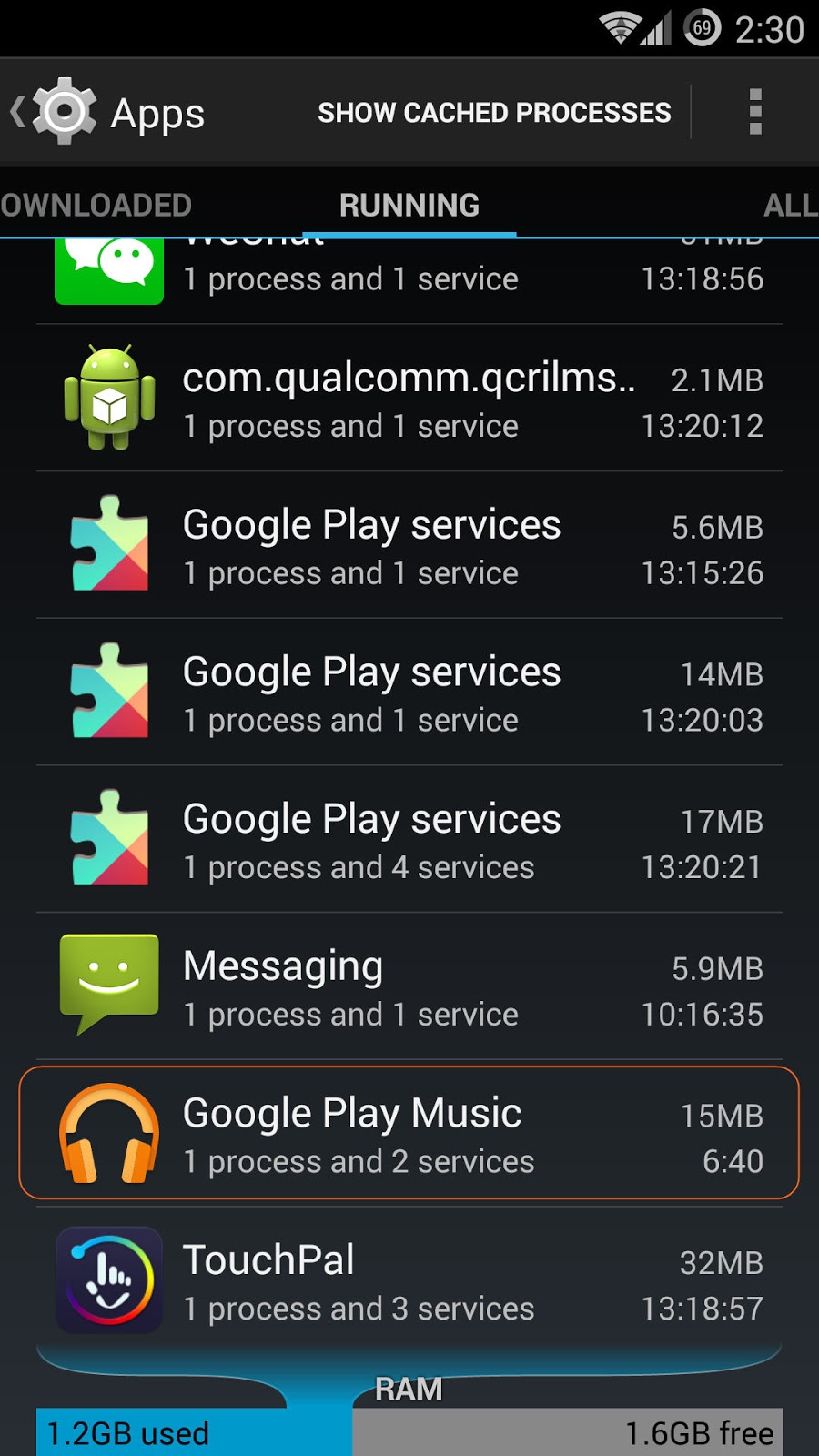
If Downloaded only is turned off, the Google Play Music process is always running, even you quite the Google Play Music app.
If you do not use the music service provided by Google and just play the music on you local storage, you can turned Downloaded only option on. To do that, just go to Google Play Music app and tap on the top left corner to display the menu and turned on the Downloaded only option.


Remove Themes Process

There is a running process called Themes. It is for the Themes to read all the notification.
 If do not use the Themes or do not need Themes to handle notifications,  you can remove this running process by following the steps below. This can free a little memory and may help on saving some battery power.


Go to Security and Select Notification access. Then un-select Themes.  The Themes process will be removed from the running processes list.


Set Performance Profile to Power Save

Under Performance, you can choose the Performance Profile to be either Power Save, Balanced or Performance.


If Power Save is more important to you (like you never use the phone to play large 3D games), you can set the Performance Profile to Power Save.


Turn off Statistics and Logging

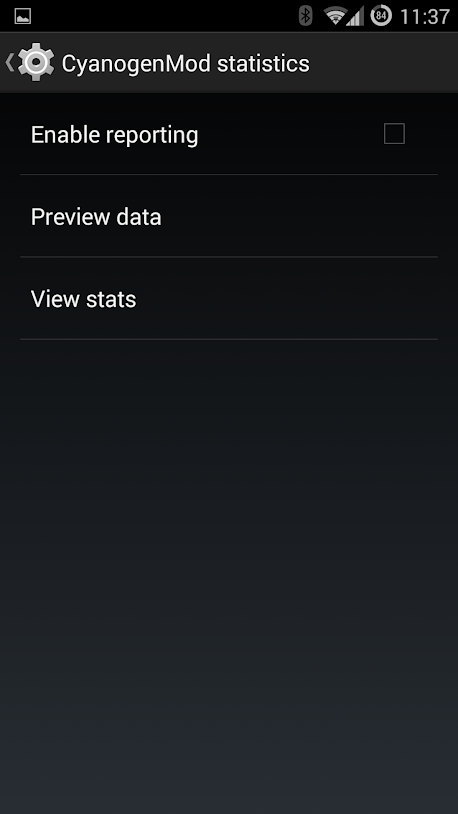
Under the Privacy setting, you can choose to turn off CyangenMod statistic and Anonymous crash logging to save battery power and free some memory. Since choose these options will cause some long-running process in the memory.


Turn on Double-tap to sleep

By turning on this option, you can double-tap on the Status bar at top of the screen to turn off the screen. No need to wait for the screen timeout. 


Turn off NFC

NFC can be used for exchanging files between phones, mobile payment and NFC tag. If you do not use NFC, you can turned off to save batter power. You can turn on anytime when you want to use it.


Turn off LTE

LTE is fast but use more battery power than 3G. If you just use phone to send message, read some news (not watch Youtube and download large files), you can choose 3G instead of LTE. 

You can turn on/off LTE easily in Mobile network settings or the Quick Setting Panel.


Turn off Bluetooth

If you do not use Bluetooth, you can turn it off to save battery too. 


Turn off Location Service

Location service in may cases is the most important factor of battery drain. You can turn off location service and only turn on when you needed like taken a photo needs to remember location or use GPS to navigate.

Even if you need to turn on Location Service, you can also choose not to report location and location history.

Kill/Uninstall Battery Offenders

By looking at the Battery screen under Settings, you can identify if there are any apps which use lots of battery power. If there is a apps uses lots of battery even you are not use it, I suggest you can stop it by tap on that app and choose Force stop. If this app keeps coming back you can uninstall it.


By looking at the Awake and Screen on lines in the History details, you can determine if there is something wrong. This two lines should have similar pattern. If the screen is off but Awake is on, there must by some app keep the phone wake up even screen is off. You can try to find that app by using a powerful tool provided by Cyanogenmod - Privacy Guard.

Use Privacy Guard to fine-tune 

Go to Settings - > Privacy -> Privacy Guard. Select the menu button at the top right corner. Then select Advanced.


Advanced view shows the activities of all services and applications in detail. You can see which services or applications are running and when running. Also how many requests they made, like request the locations. If you find some services or applications have lots of requests and you do not need that (for example, a music player make request for location or modify contacts), you can deny the requests by tap on this service or application and then choose the Denied. 

Following sample shows the LocationServices makes lots of request to Keep awake (even screen is off). This may consume lots of battery power. You can try Deny this kind of request. This might significantly improve standby time. But you need to be careful since some functions may not work. 


Use ART to replace Dalvik runtime

With developer option turned on, you can change the runtime from Dalvik to ART, which is supposed to be faster and more power efficient. ART is now standard in Android 5.0.
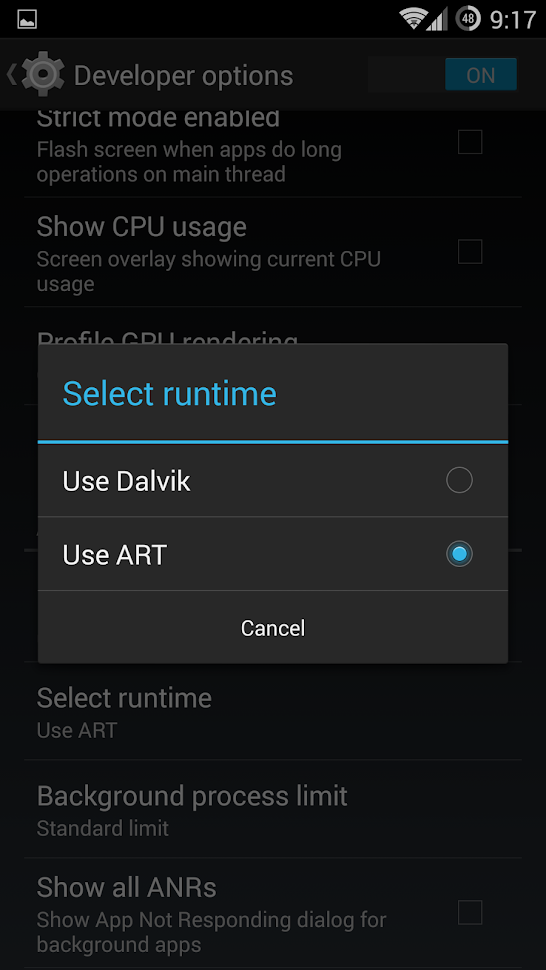

Once you choose ART runtime will be restarted and will compile all the applications one by one.

Use Hibernate Mode during night

Under the Developer options, you can enable QuickBoot mode:
With this mode on, when you long press the Power button and choose the Power off option, the phone is not really power off. It is kind of entering the Hibernate mode. It is quick (only takes 1 second). To come back, long pres the Power button again, it only takes 2 seconds to return the previous state of your phone.  


This mode is very useful if you want to save maximum battery at night (better than the Airplance mode).


More topics:
OnePlus2 Killer: Lenovo ZUK Z1 USD 284


OnePlus2 Killer: Lenovo ZUK Z1


Tips on how to use OnePlus One Phone (1)


Monday, November 10, 2014

How to buy OnePlus Phone from Canada


Latest Xiaomi RedMi Note 3 Coupon Price USD 169

OnePlus2 Killer: Lenovo ZUK Z1 USD 284

OnePlus2 Killer: Lenovo ZUK Z1

Fitbit Flex Killer: MiBand Smart wristband for $ 10 + Free Shipping

The 2014 flagship killer - the OnePlus Phone maybe the most valued phone in this year. At the price of $349 (USD), you get the similar specification and quality of other flagship phones which you need to play double or triple price.

The specifications are very impressive:

Qualcomm© Snapdragon™ 801 processor with 2.5GHz Quad-core CPUs (same as Galaxy S5)
3 GB RAM  (Galaxy S5 only has 2GB)
5.5 inch JDI1080p Full HD (1920 x 1080 pixels), 401 PPI
64 GB Storage
3100 mAh battery 


The build quality is also very impressive, on par with other flagship phones, like Galaxy S5.
The OS is Cyanogen which basically is the pure Android plus some cool customization features. For example, you can double-tap to wake the phone, draw a circle on the screen to invoke camera. The OS update is much faster than other big companies. OnePlus promise will upgrade to Android 5.0 within 20 days after Google.

This phone's camera is also very nice and it can take slow motion video (like iPhone 6). Another benefit is that it supports USB OTG, this means it can read/write a USB drive directly (either the USB drive with microUSB or with a OTG cable).

However, you need a invitation code to get one. If you don't have invitation code, the good news is there will be a 1 hour time on November 17 open to order. If you did not catch this window, almost every month, there will be a short time (one hour to one day) open to order. Just keep visit the One Plus site to see the notice.

On October 27 there was a first wave of pre-order and all the people I know have successfully ordered their phone (even the server was down for the first 10 minutes). Just keep trying and the order will go through.

You can click the link below to start prepare like register a account, fill in your shipping address and choose the phone and accessories. But you need to come back at November 17 (11AM to 12PM) to finish the order. For example, in December 2014, there was a one day open for order to celebrate one year anniversary.


You also need a Paypal account. If you don't have one, make sure you create one and associate with your credit card (do not need to be US Dollar credit card) before the pre-order begin.

You can order 1 or 2 phones. I suggest you order 2 (ask someone to order together with you if you only need one). This is because the shipping & handling fee is the same ($27.99) for 1 and 2 phones. You may also pay less tax and duty.

The protective case or the flip cover is recommended. The Flip Cover provides better protection than protective case and can automatically turn on/off the screen when you flip the cover. The protective case is too thin and too slippery.

Comparing with Apple's case ($55), flip cover only costs $14 (sometimes on sale). A unique bamboo cover is also available at the cost of $49.


As for the tax and duty, I know someone who ordered using invitation code paid around $60 (CAD) per phone. However, for many people ordered in the October 27 pre-ordered time, the tax and duty is much less: Only $30 (CAD) for 2 phones!

So if you ordered 2 phones and you are lucky, the total price is around $349 + $30 = $380 (USD).

The shipping company is DHL, which provide excellent and fast service. It only take one day to deliver once the phone is picked up. If nobody at home, it gives your options of delivery again or leave at the door.

Recently DHL seems correcting the real value of the phone and some people paid around $110 (CA) for two One Plus Phone (64G) for duty and tax.

You can use the following link to track the shipment:

http://www.dhl.com/en/express/tracking.html

The tax and duty can be either paid on delivery or pre-paid online through the following link:

http://mypayment.dhl.ca/

Good luck!

Related topic:

How to save OnePlus One battery

XIAOMI RedMi Note 2 LTE Only USD 162 With coupon


Thursday, October 30, 2014

Backup Desktop Photos Using Free Unlimited Storage From Google


There are many companies providing free cloud storages to backup the photos taken by your smart phone, like Apple iCloud, Microsoft One Drive and Drop Box.

Once you took a photo, it will be copied to cloud so the photo will not be lost even you lost your phone. Backup to cloud also provide other benefits like easy to view the photos from anywhere and easy to share with other people.

But what about the phones taken by other cameras like point and shoot camera and DSLR? The size of these photos are usually huge and the free space provided by these company are not enough. For example, myself have around 40000 photos and the total size is around 400GB. While the free space provided by these company are from 2G to 30G.

Good news is that Google quietly provides unlimited free storage for all of your photos (Google+ Auto Backup), as long as these photos are backup using 2048px resolution. For me, this resolution is enough since my main purpose is to view on the web and sharing.

In order to use Google+ Auto Backup,  first thing you need to do is install the Auto Backup application on your computers. Both PC and Mac are supported. If you already have latest Picasa installed on your computer, the Auto Backup application should be already installed as part of the Picasa. Picasa is a excellent free software provided by Google to organize, edit and share your photos.


If you do not want to install Picasa, you can just download and install the Auto Backup application through the following link:


Both Windows and Mac are supported.

Before staring backup, you may want to do the following for easier search and manage your photos.

1. Add the dates to the photos if dates are not there.
For some old photos or scanned photos, there is no date information. You can use tools like Picasa to add the date. Google will use the date of the photos to organize and also you can search on dates to find the photos.

2.  Add captions to your photos.
You can use Picasa doing that. This is also for easier to search once the photos are backup.

3. Add location information to your photos
Old cameras do not have GPS. You can use Picasa add location information (by clicking on the map). These information is useful when you search by locations. Google also uses the location to create stories for your photos.

Now you can run and configure Google+ Auto Backup.


Windows


Mac (click on Preferences)

First you need to choose the folder which contains the photos you want to backup. Then choose the Photo size. This step is most important. Make sure choose Standard Size (Unlimited Free storage at 2048px).


Windows


Mac

Once click OK, is done!  You can use and close the computer as usual. The backup will automatically begin if there are internet connection. It has minimal impact on the computer.

The icon of Auto Backup will be displayed on the status bar to show you the process.


Windows

How long does it take to backup? It depends on how many photos you have. For me, backup close to 37000 photos takes about 3 weeks. Of course, if you keep your computer always on, the time will be shorter.

Make sure do not backup sensitive photos to cloud, think about Jenifer Lawrence.


You can view your backup photos using the following URL:


Or go to Google Plus page and choose Auto Backup as the following:

You can also search photos using keyword, date, year. For example, type "2002" will list all of the photos taken in 2002.

You can share photos by click on the Share button on the top of the photo.


Another way to share is right click and copy the Image URL.


Google will automatically enhance the photos for you. If that is not enough, you can click on the Edit button to enhance photo yourself using the free tool provided by Google.

You can also add caption, location or change Date taken if you did not do that before backup.


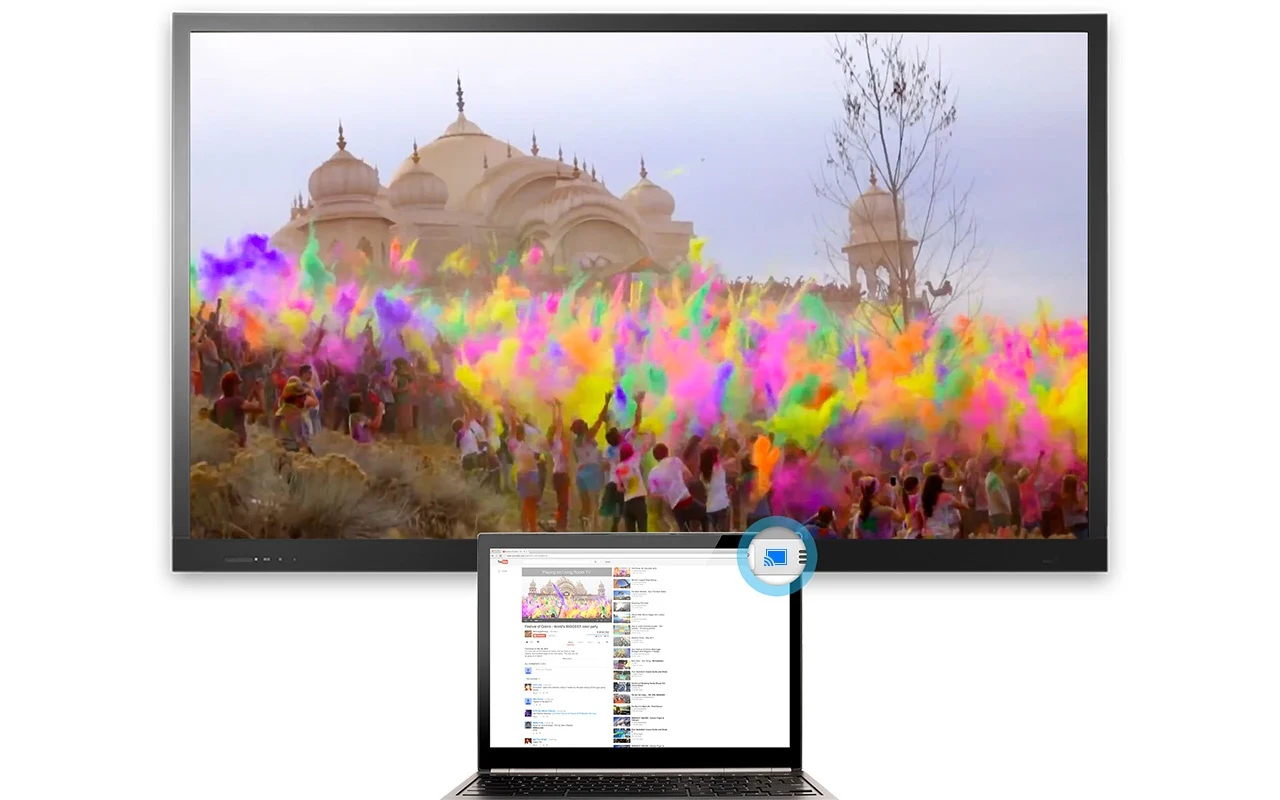
If you have Chromecast, you can project Auto Backup Photos on TV.

Just install a Google Cast plugin to your Chrome browser.

https://chrome.google.com/webstore/detail/google-cast/boadgeojelhgndaghljhdicfkmllpafd?hl=en


Tuesday, October 28, 2014

The Art of Cake


Do you dare to eat?


How many layers inside earth?


Can you guess what is this?


Lego Lover


Sweet Bath


If I can eat books....


Are these really cakes?


Sweet Sushi


Are the spoon and the can eatable?

Lots of sweets.


Saturday, May 24, 2014

Lenovo Canada Laptop Price Error


Guess what are your co-workers doing on Friday afternoon (May 23, 2014)? Most likely they are busying to order a IdeaPad Y410p for a amazing price of $279. This is unbelievable since it has i7 CPU, 8G Memory, 1T hard drive and JBL speaker. Just the i7 CPU alone worths more than $300.

The normal price is $1279. It is a price error since it applies the $500 promotion twice.


Here is the order confirmation

QtyPart no.DescriptionStatusPriceTotal
159392489Lenovo Y410p Laptop - 59392489 - Dusk Bl
-System details
Processing$279.00$279.00
Subtotal$279.00
Environmental Handling Fee$1.30
Tax (G.S.T./H.S.T.)$36.44
Tax (P.S.T./Q.S.T.)$0.00
Total$316.74

It take almost 24 hours for Lenovo to fix this problem. If you visits the same price again, the price back to $789:
http://shop.lenovo.com/us/en/landingpage/promotions/ideapad/weekly-sale/?TMMClickTrack=espot

For customers who ordered, they will get a cancellation email like the following:

o:    &nbsp 
Re:    Lenovo Order 4243693623
Ref:     


Dear Valued Customer,

Thank you for your recent Lenovo purchase. Due to a pricing error on our website, we will have to cancel your order. We sincerely apologize for the inconvenience this has caused, and would like to help you place a new order.

We invite you to visit our website at www.lenovo.com or speak with a Product Specialist at 1-855-253-6686 opt1, opt1 as we have updated all current pricing and configurations.

Thank you for your time and patience. We look forward to hearing from you.

Kind Regards,

Lenovo Customer Service


But according to many customers, the order number in the email does not match their order numbers. What can you do right, Lenovo?

Be honestly, I do not expect I can get the 3 laptops I ordered, but at least I would expect some gift cards (like last time the famous $49 Bomber Jacket from Marks Warehouse, I got $10 gift card for the cancellation of the order).

List of the events
Wednesday
-Lenovo advertised several laptops in a doorcrasher sale
Thursday
-The deal was posted on RFD
-The deal was available through the WorkPerks and Perkopolis portals and the main website.
-Thousands of people purchased the Y410P laptop for $279
Friday
-Lenovo commented on Twitter about the issue in the early morning
-Lenovo sent out cancellation emails, some with wrong order numbers, around noon
-Email claimed that the pricing had been fixed but it was still the same
-Email asked people to make a new order
-Thousands more people ordered laptops
-The issue was taken down from the main website and the Perkopolis portal
-The hashtag #lenovosucks started trending on Twitter as consumers started fighting back
-Lenovo finally fixed the issue late Friday
Saturday
-Most have been charged for the orders even after receiving the cancellation emails
-Most orders are stuck at "Released for Manufacturing"
-Rumor is that Lenovo sold 1.6 million laptops (highly unlikely but they did sell a lot)
-Rumor is that Lenovo had to put together a special team just to deal with this issue
-Lenovo is staying quite but it supposed to comment on the issue on Monday or Tuesday
-People are complaining to the Competition Bureau and other consumer protection agency's 
-RFD moderator had to lock thread to delete troll posts


Currently, more and more people are get angry at Lenovo, see the discussion below:
Redflagdeals
http://forums.redflagdeals.com/lenovo-canada-lenovo-laptop-y410p-14-i7-4700mq-gt755m-279-regular-1-389-a-1484456/

Reddit Canada
http://www.reddit.com/r/canada/comments/26cb55/lenovo_offers_laptop_at_a_great_sale_price_then/

Aphnetworks
http://aphnetworks.com/news/12837-lenovo-canada-cancels-orders-laptop-pricing-error-faces-pr-backlash-short-editorial


What you can do:
E-mail virtstor@lenovo.com to complain. Your email will open a formal case file for your complaint and order.

Post comment on Facebook Lenovo
Facebook Lenovo
https://www.facebook.com/lenovo

File a Competition Bureau Complain
http://www.competitionbureau.gc.ca/eic/site/cb-bc.nsf/frm-eng/GH%C3%89T-7TDNA5

Change.org Petitions
http://www.change.org/en-CA/petitions/lenovo-canada-please-honour-the-pricing-on-your-website
Free Shipping + UP to 67% OFF: Xiaomi Brand Special Collection