Galaxy Nexus is a great phone. However, the battery performance is not that great. Most likely you have to charge daily. With the following few tips, you may be able to extend the battery usage to two days.
Set to Airplane Mode during Night
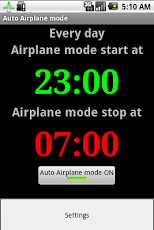
Why let your Galaxy Nexus also sleep when you sleep? I use a free app called Auto Airplane mode to automatically set phone to air plane mode (which turn off Wi-Fi, data and voice) during night. Air plane mode use little battery so it can greatly improve phone's standby time.
I think Google should be make this function as part of Android.
Turn off GPS
GPS may use lots of battery. You can turn it off in Location access setting and only turn it on when you need to use it.
I suggest still keep Access to my location and enable Wi-Fi & mobile network location since there are may apps rely on this.
Turn off Location Settings
Location services are useful. Google Now use it to provide you information according where you are. Fore example, when you are near the bus station, Google Now can automatically display when next bus will be arrived. Location services is also good for other people since Google use it to gather your speed and location, which is used by Google Map to show traffic information. However, location services also consume your battery. If you find Maps use too much memory even you are not using it, then you may want to turn off the location service.Only turning it on when you need to use it.
Open Google Map's setting menu, choose Location settings, then un-check the service you do not use. For me, I un-check all of them.
Turn off Google+ Sync
If you do not use Google+ frequently, you can turn off the Notification, Messenger and Hangout service.
Instant Upload is useful since it will automatically upload your photos to Picasa web album for backup. But you can change the setting so that Upload only when charging and only when there is a Wi-Fi connection. This can help save battery too.
Turn off Auto Update Apps
If you have lots of apps installed, each day there are may be several apps need update. This may use some battery. I suggest you disable Auto-update apps and also set Update over Wi-Fi only. You can still manually update apps with Auto Update Apps turned off.
Uninstall Top Battery Users
Go to Settings, Battery to check which apps use most battery. If it is a third party app you do not use but still consume lots of battery. Try uninstall that app.
Set Wall Paper to Pure Black.
Like many other phones made by Sumsung, Google Galaxy Nexus also use AMOLED display. Each pixel in AMOLED is turned off if it is showing black colour. By setting your background as pure black can help turn off the pixels at background and hence reduce the power assumption for display. Since screen is usually the number one battery eater, black background can improve your battery time a lot. This is one of the reason the Android system menu (like Settings) also use black as background color.
Personally, I also like black background since it makes the icons more colorful and brighter.
The easiest way to set background to black is install a free app called Colors. It can set background to many solid colors, including black.
Try not use live wall paper since it eats more battery than normal wall papers.
Use LED Notification Light
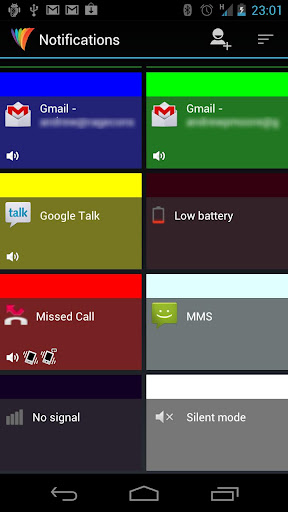
Galaxy Nexus (also many other Android phones like Galaxy S3 and HTC X1 but not iPhone) has the LED light which can be used to notify you if there is any new emails, missed calls, calendar reminder using different color at a glance, without turning on screen. This can reduced the screen on time and also save you time to unlock the screen to check.
I use a free app called Light Flow Lite to control the LED lights. It works great on Galaxy Nexus. You can choose color, frequence, sound and vibration for different notifications. For example, it uses green light to indicate there is new emails and uses red light to show there is a missed call.
There is also a paid version called Light Flow with more functions. For me, the free version is enough.
Turn off NFC
NFC is a great feature but it may still time for it to be popular. If you do not use NFC, you can turned off to save battery.
Go to Settings, click More..., then un-check the NFC check box
Buy a Bigger Battery
If all the above tips can not save your battery to what you expected, the final choice is buy a bigger battery.
I bought the following 3850mAh from Amazon.com.
http://www.amazon.com/gp/product/B006SKHIKG/ref=oh_details_o04_s01_i00
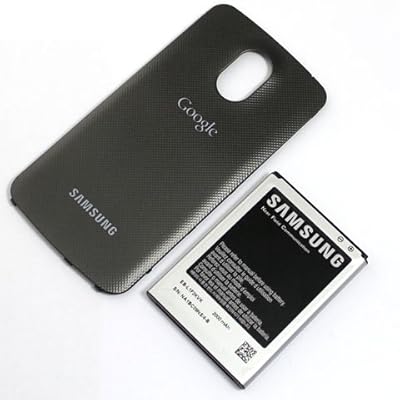
The size is huge and comes with a cover. However, I do not recommend this battery for several reasons. First, it it too big. You have to use the cheap cover comes with it. One of the teeth of the cover broke after one day's usage. You can not use the phone case and you also lose the NFC. I only use it occasionally when I need to heavily use for a day. The 3850mAh is more than double of the capability of the stock battery (1750mAh) but in real use it seems it does not double the time. After market batteries always 20% less than what they claims. The advantage is the price is pretty cheap. Only $15.
I recommend the Samsung genuiue 2000 mAh battery. It comes with the Samsung genuine cover which supports NFC and only slightly bulky than the original cover. So you phone case may still be able to fit in.
Note that when you buy the battery, do not buy the one designed for the US Verizon version. Its battery size is smaller and can not fit in to the Galaxy Nexus bought directly from Google.
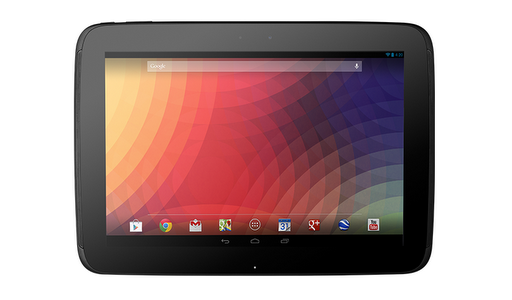
iPad still dominates the tablet market. So many Android tablets (like Motorola Xoom, ASUS transformer and Samsung Galaxy Tab) have trying to challenge iPad but all failed. Will the new Google Nexus 10 be the real iPad killer? Let's find out.
Screen
iPad 4: 9.7 inches 2048 x 1536 264 ppi Nexus 10: 10.1 inches 2560 x 1600 300 ppi - Winner
Pad 4 still has the same retina display as the iPad 3. It features a ingerprint-resistant coating.
I own a iPad 3, the display is simply amazing, especially when using it to view a magazine.
Nexus 10 has the highest resolution display for tablet with 300 ppi. Finally, iPad is no longer the king of the display. This is the biggest sale point for Nexus 10. It also features Corning Gorilla Glass 2 which is thinner and provides better view.
From specifications, Nexus 10 is the winner. From the hands on review, it seems like the specifications don't lie. The Nexus 10 display is gorgeous and absolutely amazing.
Apple A6X is a new dual-core CPU combined with quad-core graphics. According to Apple, it is up to twice as fast as the previous-generation A5X chip.
Samsung Exynos 5250 (also called Exynos 5 Dual) is the world’s first mobile processor built on ARM’s new A15 architecture. It supports WQXGA (2560×1600) resolution, 1080p 60 FPS video and USB3.0. This CPU is also used on recently released Samsung Chromebook.
Both processors are based on 32nm length technology which is more advanced by the previous 45nm length. Exynos 5250 has higher frequency (1.7GHz vs 1.5GHz).
According to Benchmark Testing, Exynos 5250 handily beats A6X in all aspects by a large margin. Exynos even beats Intel's Atom and Quad-Core Tegra 3 (Quad-Core does not mean performance is better than Dual-Core). It maybe one of the fastest mobile CPU on the market.
It is interesting that A6X is also manufactured by Samsung (it is designed by Apple). So this explains which CPU is better.
RAM
iPad 4: 1GB Nexus 10: 2GB - Winner
The size of the RAM is important to multi-task performance. The bigger the RAM, more apps can stay in RAM so that switch will be much faster.
Sound
iPad 4: Mono Speaker Nexus 10: Dual Stereo Speaker - Winner
iPad 4 speaker sound is pretty good (comparing with Nexus 7). But Nexus 10 has two stereo speakers both front facing.
NFC
iPad 4: No NFC Support Nexus 10: 2 NFC Support
NFC is getting more and more important. It allows you easily share photos, videos, contact, web pages and more between two NFC supported device by just simply touch each other. Here is an video show how to do it.
Size
iPad 4: 241.2 x 185.7 x 9.4 mm Nexus 10: 263.9 x 177.6 x 8.9 mm - Winner
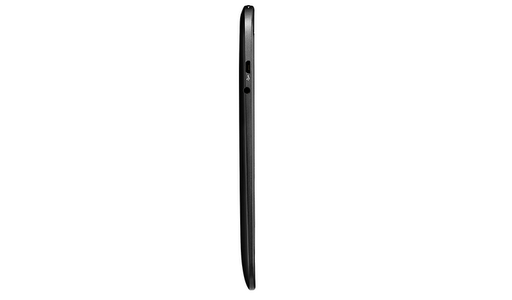
For tablet, the most important size is the thickness. In this case, Nexus 10 is thinner than iPad 4, thanks to the thinner Corning Gorilla 2 Glass.
Weight
iPad 4: 652g Nexus 10: 603g - Winner
One of the complain to iPad 3/4 is it is too heavy. You can not hold it for long. Nexus 10 is doing slightly better in terms of portability due to its plastic case.
Since Android 4.1, Android already catches up with iOS in terms of the smoothness of user interface with the "Project Butter". With the introduce of Android 4.2, now it is iOS who play the role of catching up. Android 4.2 brings many new exciting new features. The most important one is the multiple user support. Each person who shares the same tablet can have their own home screen, background, widgets, apps and games – even individual high scores and levels.
Another new feature is Miracast. You can share movies, YouTube videos, and anything that’s on your screen on an HDTV. Similar to Apple's AirPlay but better since Miracast is industry standard. In the near future, Smart TV will have build in support. While Apples' AirePlay requires you buy Apple TV, which costs about 100 dollars.
Google Now is also enhanced in Android 4.2. It can provide information before you even ask. Now it can read from your Gmail and provide information like package tracking and flight information.
Google Now also supports voice command like Apple's Siri but is more useful. Here is an video show you more than 40 ways of ask Google Now.
Compared with Android 4.2, iOS 6 only brings some minor upgrades like integration with Facebook, Passport. The new Apple Map is a even setback from the Google Map.
Applications iPad 4: 275,000 Apps Designed for iPad - Winner
Nexus 10: Much less Apps Designed for Tablet
This is biggest advantage of iPad over Android tablet. There are many gorgeous apps can be only found on iPad. Even the apps which has both version, the iPad version usually comes out first and looks better. One example is the must-have reading app Flipboard. It first comes to iOS and just recently comes to Android. Nexus 7 can have Flipboard but it is phone version. There is still no Flipboard for 10 inches Android tablet.
Another example is the popular game called DragonVale. Until now, it only has iOS version.
iOS Newstand app supports more magazines than Google Play Magazine, including National Geographic.
Fortunately, the good news for Android users is that the gap is reducing since the introduce of Nexus 7. There are more and more apps designed for tablet. There are some good apps only have Android version. For example, Dinosaur War.
Developers can not ignore the 1 million Nexus 7 sold for every month. With the introduce of Nexus 10, more developers will develop apps for Android tablet since there will be more users.
Design iPad 4: - Winner
Nexus 10:
Although the design has not been changed much since iPad2, iPad is still the most beautiful tablet. The Aluminum case feels solid and upscale. The smart cover is very convenient.
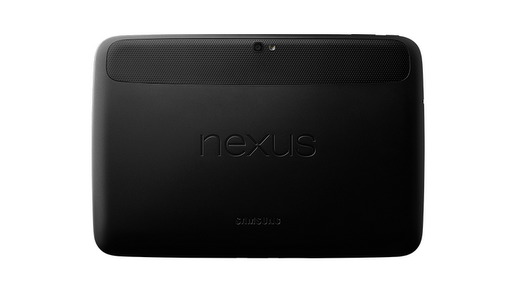
Many people find Nexus 10 is ugly, mainly due to the curved edge since people already get used to the rectangle with round corner shape for tablet. Samsung designed this way maybe to avoid being sued by Apple using the "Rectangle with round corner" patent. Actually, if you see the real thing, Nexus 10 is not bad. It is thinner and lighter than iPad 4. It also have smart cover but can not fold like iPad's.
Battery iPad 4: 11666 mAh - Winner
Nexus 10: 9000 mAh
iPad 4 can have 10 hours of usage under Wi-Fi while Nexus 10 only have 9 hours. For standby time, I expect iPad 4 will be better than Nexus 10 according to my past experience of using Nexus 7 and iPad 3. Apple is really good at battery technology. You can leave a iPad for a month and still find it has battery. While my old Transformer Tablet can only standby for 3 days. This may be the biggest advantage against Android tablet. Hope Nexus 10 will be better than Nexus 7 in terms of standby time.
Camera iPad 4: 5MP 1080p rear, 1.2MP 720p front - Winner
Nexus 10: 5MP 1080p rear, 1.9MP 720p front
Although Nexus 10's front camera has more pixel, I still think iPad 4's camera is a winner. iPad 4's camera has backside illumination and a f/2.4 aperture for low lit photography. According to the experiences with previous Nexus devices, camera is always a weak point. But hey, who cares about the camera on a tablet?
Nexus 10 is $100 less than iPad 4 for the same storage size but the difference is smaller than the difference between Nexus 4 and iPhone 5 ($349 vs. $699 for 16G). Amazon Kindle Fire HD 8.9 has cheaper price of $299. However, its display and processor can not compare with Nexus 10 and iPad 4.
If Nexus 10 price is $349, it will be a killer (even iPad Mini costs $329). I expect Nexus 10 price will drop $50 in half year (similar to Nexus 7).
Nexus 10 will be available to purchase on Nov 13, 2012 though Google Play Store. US price is $399 for 16G, Canada price is $409 for 16G.
In summary, Nexus 10 has advantages on display, power and features provided by Android 4.2. iPad is good at battery, design and more applications.











sBPi!rp)erQ~~60_12.JPG)